
Prices checked on au.carlinkitfactory.com on 21 September 2026. This review draws on the official product specifications, two independent tests published by TechTwo.tv, and verified buyer reviews on our product page. Where a finding comes from a third party, we say so.
If you want the short version of this Carlinkit TBox UHD review: it is the most affordable way in the Carlinkit Tbox Series to put a full Android system on your factory screen and feed a rear-seat display over HDMI. It is not the fastest box we sell. At A$308.99, it makes sense when the second screen matters more to you than raw speed.
Quick verdict
- Buy it if: you have factory wired CarPlay or Android Auto, want wireless connection, and have (or plan to add) a headrest or rear screen.
- Skip it if: you drive a BMW or Tesla, or want the smoothest possible app experience.
- Price: A$308.99 (was A$408.99), 2-year manufacturer's warranty, rated 4.7 from 59 reviews on our site.

Carlinkit TBox UHD at a Glance
| Spec | Carlinkit TBox UHD |
|---|---|
| Price (AU) | A$308.99 (was A$408.99) |
| Processor | Qualcomm SDM660 |
| System | Android 13 |
| Memory | 8GB RAM + 128GB storage |
| Expandable storage | microSD, up to 512GB |
| Video out | HDMI (output only) |
| Mobile data | SIM card slot (4G, global version) |
| Car requirement | Factory wired CarPlay or wired Android Auto |
| Not compatible | BMW, Tesla |
| Warranty | 2 years (optional 1-year extension) |
| Returns | 30-day money-back guarantee |
What the TBox UHD Actually Is
Three modes in one box
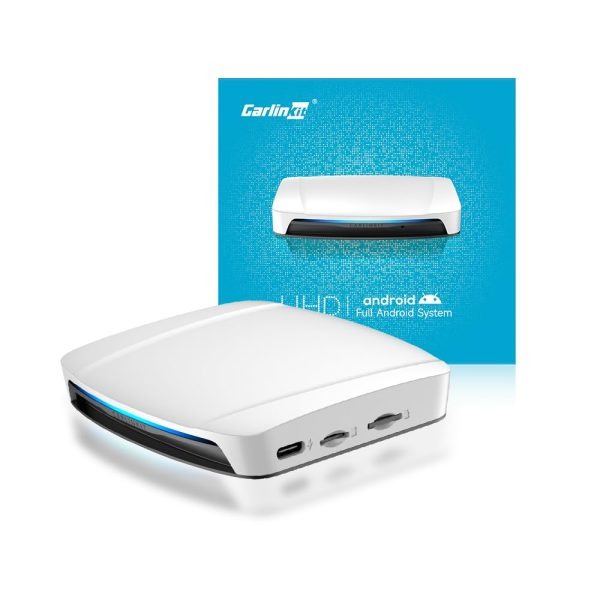
The TBox UHD plugs into the USB port your car already uses for wired CarPlay or Android Auto. From there it gives you three ways to use the screen:
- Wireless CarPlay for iPhone
- Wireless Android Auto for Android phones
- A full Android 13 system with its own apps, such as YouTube, Netflix and navigation apps
Your factory controls stay in place. The touchscreen, steering wheel buttons and car microphone keep working, because the car still thinks it is talking to a wired CarPlay or Android Auto device.
What "660" means, and why it matters
The "660" in the name refers to the Qualcomm SDM660 chip inside. It is an older processor than the Snapdragon 6350 used in our newer boxes, with less processing headroom for heavy multitasking. The performance section below covers what that means day to day.
What the SDM660 does well is video, and that suits a box built around a second screen.
The HDMI Output: The Reason to Buy It
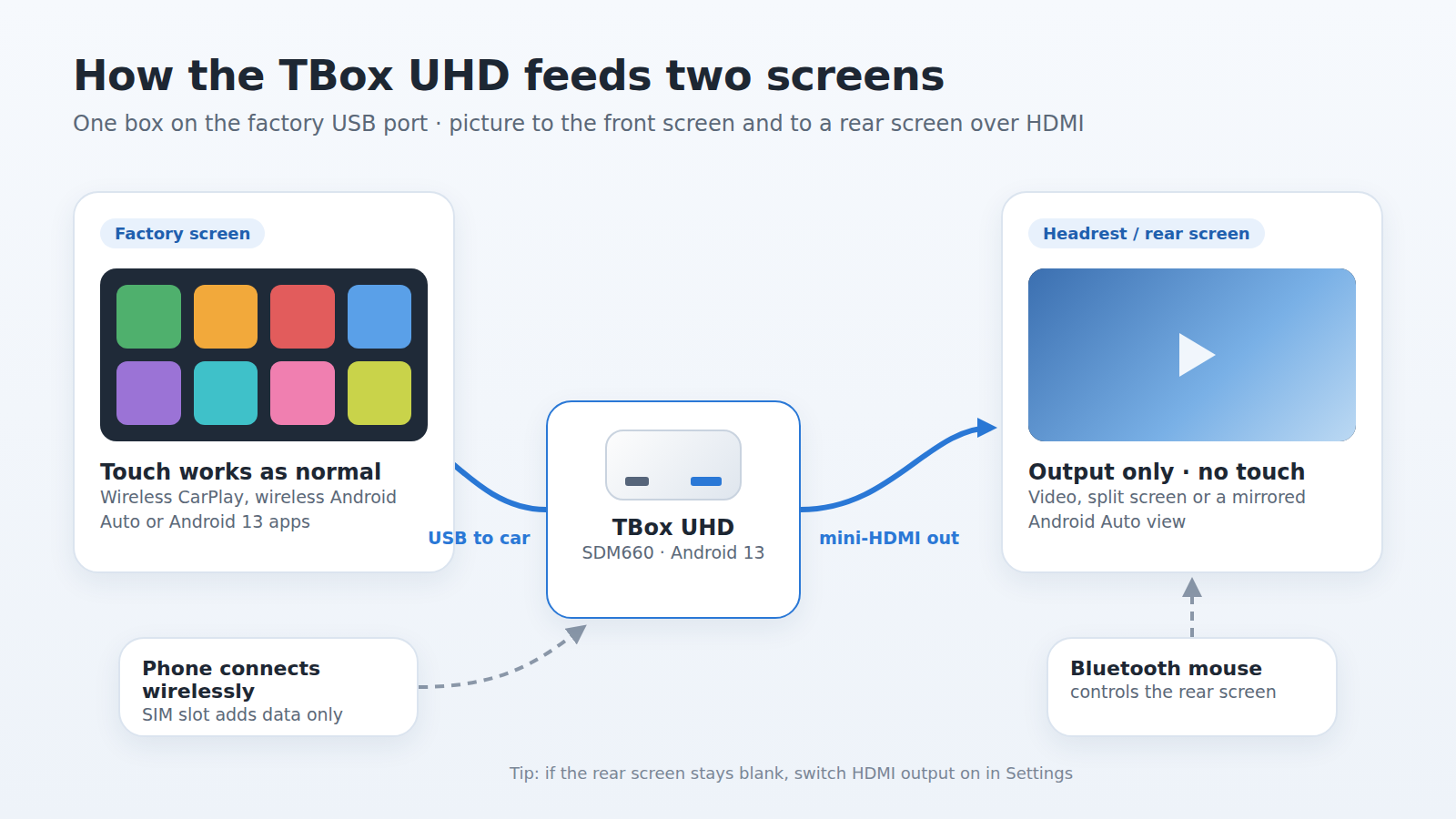
Plenty of AI boxes add apps to your factory screen. The UHD's point of difference is the HDMI output, which sends a picture to a second display.
What you can send to a rear screen
- Headrest monitors or a rear entertainment screen, so passengers get their own view
- Split-screen use, which the product page lists as supported
- Your Android Auto screen: one verified buyer reported that the HDMI port mirrored his Android Auto display to his rear entertainment system, so passengers could follow the navigation
The limits worth knowing before you buy
- HDMI is output only. Nothing comes back the other way, so a rear screen will not respond to touch.
- Use a Bluetooth mouse to control what plays on the second screen. This is our official recommendation on the product page.
- Expect a mini-HDMI connection. TechTwo's review unit came with a mini-HDMI to full-size HDMI adapter in the box, along with two USB cables and a SIM tool.
- Check the settings first. In TechTwo's first test, the monitor showed nothing until HDMI output was switched on in the settings menu. If your rear screen stays blank, look there before anything else.
Off the car: TV, caravan or holiday house
The product page confirms the UHD also works with a home TV, again with a mouse for control. For Australian road trippers, that means the same box can run a portable screen in a caravan or a TV at a holiday rental, as long as it has an HDMI input.
Performance in 2026: What Independent Tests Found
We have not published our own bench test, so this part of our Carlinkit TBox UHD review relies on TechTwo.tv, which tested the UHD twice.
Boot time and Android Auto start-up
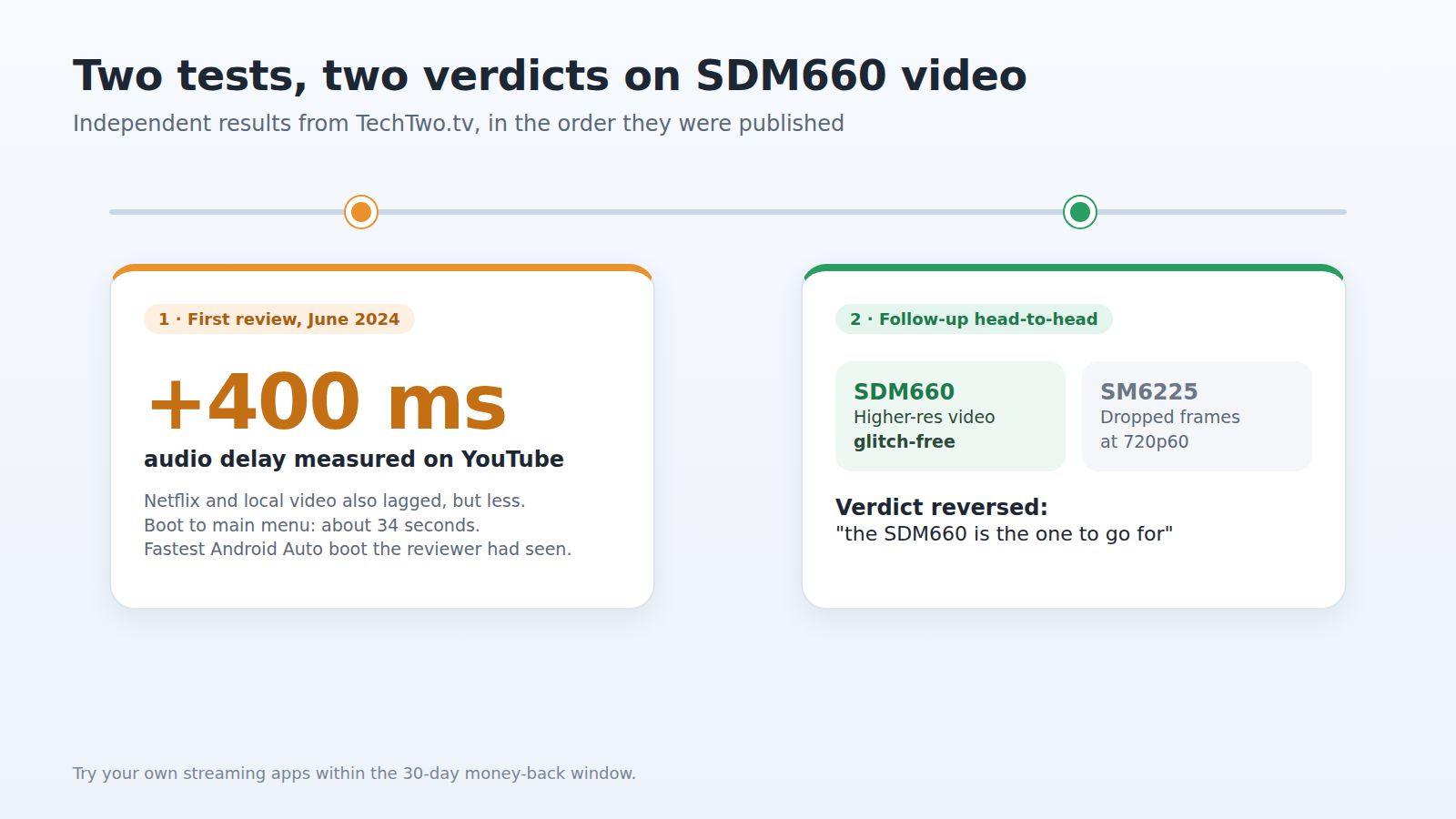
In the first test (June 2024), the box took about 34 seconds to reach the main menu. That is average for an AI box. The same test found the UHD gave the fastest Android Auto boot of any box the reviewer had tried.
In practice, expect a short wait after you start the car before everything is ready.
Streaming YouTube and Netflix: two tests, two verdicts
This is where you will find conflicting information online, so here is the timeline.
- First review (June 2024): TechTwo measured an audio delay of around +400ms on YouTube. Netflix and local video files also showed a delay, though smaller.
- Follow-up head-to-head: the same reviewer later tested the SDM660 UHD against a version built on the newer SM6225 chip. The SDM660 played higher-resolution video "glitch-free", while the SM6225 unit began dropping frames at 720p60. The SDM660 also ran games with less stutter and input lag.
The follow-up verdict reversed the original advice: "the SDM660 is the one to go for" of the two. Our honest summary is that video playback is a strength of this chip, but it is worth testing your favourite streaming app during the 30-day return window.
Everyday apps and the launcher
TechTwo described the home screen launcher as dated. One verified buyer said the box "feels like using a tablet", noting the interface could be cleaner. The same buyer called it very good for an 8GB device at this price. Another, who had read reports of overheating before buying, said he experienced none.
Bottom line: navigation, music and streaming run fine. If you mainly want quick app switching, look at the upgrade option further down.
SIM Card, Data and GPS in Australia
The UHD has a SIM card slot, so its apps can stay online without draining your phone's hotspot.
- Data only, no calls. A verified buyer reported that calls do not work through a 4G SIM in the box, while GPS, maps and media apps work well. Keep taking calls through CarPlay or Android Auto on your phone.
- Hotspot for passengers. Another buyer used the box to share its 4G connection over Wi-Fi with everyone in the car.
- GPS is single-band. As our Tbox Ultra 3 article explains, the UHD series uses L1 single-band GPS. Between tall buildings in the CBD, position can drift more than on dual-band units.
Will It Work in Your Car?
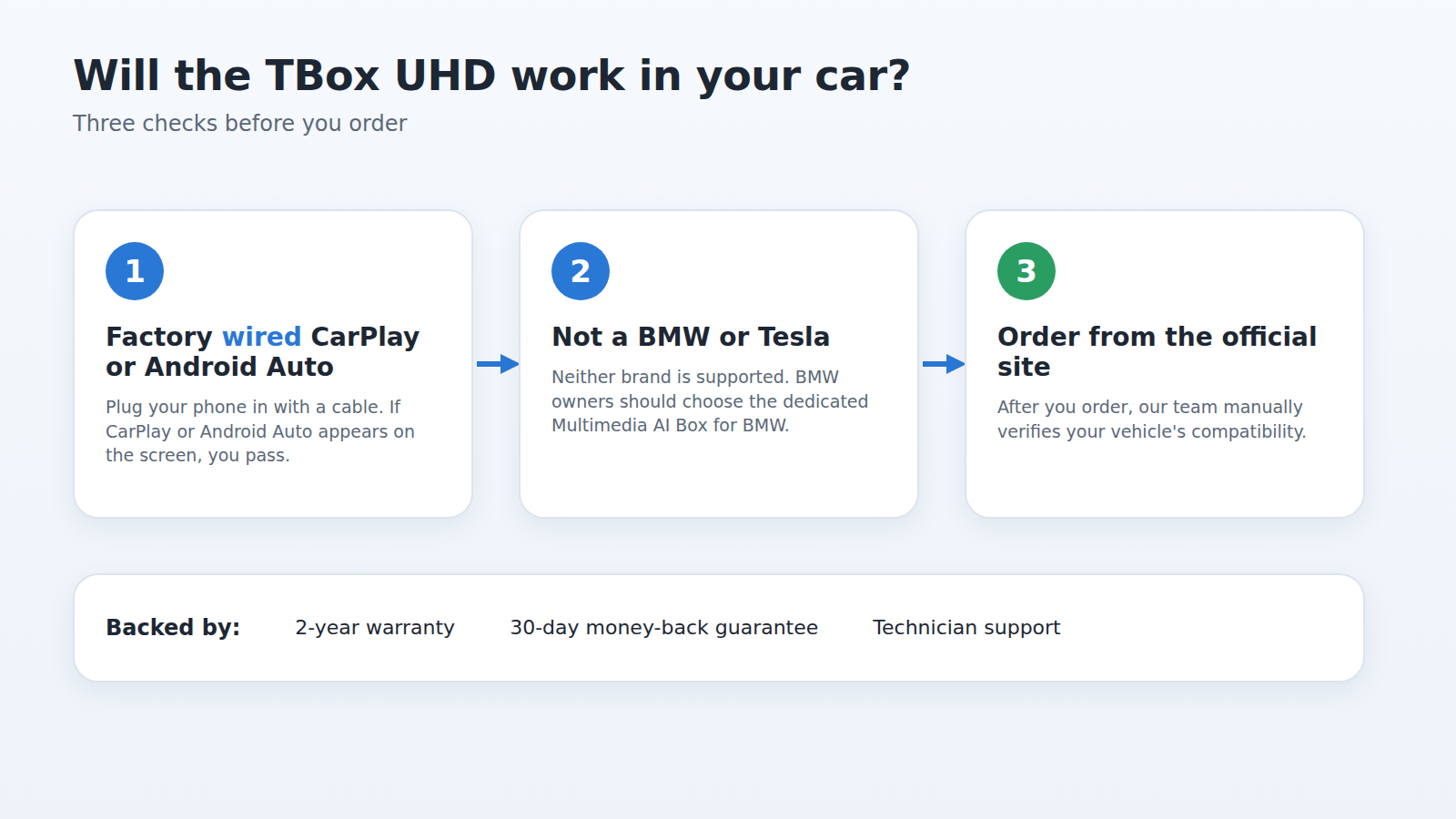
The TBox UHD is not universal. Check these three things first:
- Your car has factory wired CarPlay or wired Android Auto. The easy test: plug your phone in with a cable. If CarPlay or Android Auto appears on the screen, the box has what it needs.
- Your car is not a BMW or Tesla. Neither is supported. BMW owners should look at our Multimedia AI Box for BMW instead.
- You order from the official site. After you place an order, we manually verify your vehicle's compatibility.
One buyer reported it working in a Hyundai i20 with both Android Auto and CarPlay. For a longer list of compatibility details, see our TBox UHD features and compatibility guide.
Pros and Cons
Pros
- HDMI output for a rear or headrest screen
- The lowest-priced AI box in our range with HDMI output
- microSD support up to 512GB for offline media
- SIM slot for data without a phone hotspot
- 2-year warranty and technician support when bought from our site
Cons
- The SDM660 is an older chip with less headroom than 6350-based boxes
- Earlier testing found audio delay on YouTube
- Rear screens cannot be touch-controlled
- SIM data only, no calls
- Not compatible with BMW or Tesla

TBox UHD vs Tbox Max Ultra: The Upgrade Option
If the performance notes above give you pause, the Tbox Max Ultra (sold as "Max Ultra AI Box") is the step up. Importantly, it keeps the HDMI port, so you do not give up the rear screen.
| TBox UHD | Tbox Max Ultra | |
|---|---|---|
| Price (AU) | A$308.99 | A$409.11 |
| Processor | Qualcomm SDM660 | Qualcomm Snapdragon 6350 |
| System | Android 13 | Android 15 |
| Mobile data | 4G | 5G |
| HDMI output | Yes | Yes |
| Not compatible | BMW, Tesla | BMW, Tesla, wireless-only CarPlay cars |
Stay with the UHD if the rear screen is the main reason you are buying and you want to keep the budget near A$300.
Spend the extra A$100.12 on the Max Ultra if you want a newer Android version, 5G data, and a faster processor for everyday app use.
Verdict: Who Should Buy the Carlinkit TBox UHD
The TBox UHD does one thing especially well: it turns a car with factory wired CarPlay into a two-screen setup, and no other box in our range does that for less. The SDM660 is not the newest chip, but independent testing shows it handles video well, and that is what a rear screen needs.
To sum up this Carlinkit TBox UHD review: if HDMI output and value matter most, it is a sensible buy. If speed matters more, the Max Ultra is the better fit.