
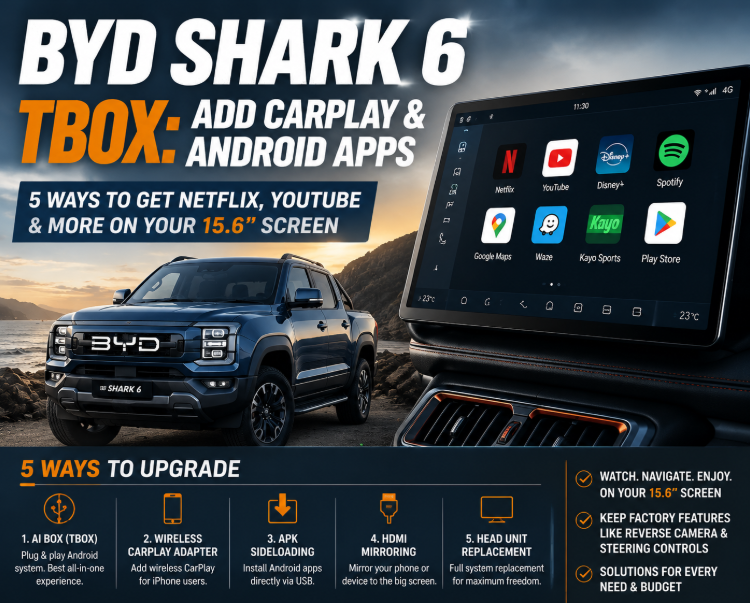
BYD Shark 6 TBox: Add CarPlay & Android Apps
Your BYD Shark 6 ships with factory wireless Apple CarPlay and Android Auto, but the CarPlay protocol itself blocks video and streaming apps at the operating-system layer. Netflix, YouTube, Disney+ and the full Google Play Store never appear inside the CarPlay interface, no matter which phone you plug in. When Australian owners search for “BYD Shark 6 TBox” or “add CarPlay and Android apps”, they are usually looking for a plug-in Android box that sits underneath the factory system and unlocks those apps. That is one of five real paths for adding apps to your Shark 6 screen, and each path suits a different owner.
What Your Shark 6 Screen Already Does
Every Australian-market BYD Shark 6 in the current Premium trim runs a 15.6-inch rotating touchscreen powered by BYD's DiLink infotainment system, paired with a 10.25-inch driver cluster and a 12-speaker Dynaudio audio system. The base Dynamic trim sold in some markets uses a smaller 12.8-inch fixed screen with the same DiLink software underneath.
Out of the box, the factory setup gives you wireless Apple CarPlay and wireless Android Auto after the DiLink OTA update, BYD's built-in satellite navigation, Bluetooth phone calling and audio streaming, steering-wheel volume, track skip and EV/HEV switching, three-finger swipes for climate (left and right change fan speed, up and down change temperature), automatic ambient light dimming, reverse camera priority whenever you shift into R, and over-the-air firmware updates directly from BYD.
What the factory setup does not give you is any way to install Netflix, YouTube, Disney+, Kayo Sports or apps from the Google Play Store onto the screen itself. That is not a BYD limitation. It is how Apple's CarPlay and Google's Android Auto protocols are designed to work. For a fuller model-by-model breakdown of factory CarPlay support, our guide to BYD's factory CarPlay across the Atto 3, Seal, Dolphin, Sealion 6, Sealion 7 and Shark 6 covers each model side by side.
Why CarPlay Blocks Video Apps
Apple's CarPlay guidelines block video-based apps such as Netflix, YouTube, Disney+ and Foxtel Go at the protocol layer, and Google enforces the same restriction on Android Auto. That block sits above BYD's software. Even if Netflix is installed on your iPhone, it will not appear inside the CarPlay app grid, and no future update to the Shark 6 will change that.
The reason is regulatory. Both Apple and Google treat CarPlay and Android Auto as driving-focused mirroring layers rather than full app platforms, and Australian road-safety law backs that decision by prohibiting video playback in a driver's line of sight while a vehicle is in motion. If you switch from the Shark 6 to a Ford Ranger, a Toyota HiLux or a Tesla Cybertruck, the same restriction applies wherever CarPlay runs.
Which means adding streaming apps to a Shark 6 screen is not really a BYD-specific problem. It is a question of what you are willing to put in front of, or alongside, the factory CarPlay layer.
The Five Real Ways to Add Apps to Your Shark 6 Screen
Every option below is in active use by Australian Shark 6 owners today. They range from spending nothing to spending several thousand dollars.
Level 0: Keep the Factory System and Use a Better Phone Setup
Some Shark 6 owners never need more than what factory CarPlay already offers. Open CarPlay, run Google Maps or Waze from your iPhone, listen to Spotify or Apple Music, take calls through the Dynaudio system, and use the factory 15.6-inch screen as the beautiful mirror it was designed to be.
- Cost: $0
- What you get: Everything CarPlay allows
- What you do not get: Video, streaming, Play Store, offline apps
- Best fit: Daily-driver owners who rarely use the screen for entertainment
Level 1: Phone Hotspot Plus a Rear Tablet Mount ($30 to $80)
For families running long-distance drives or towing a caravan interstate, mounting a tablet on the front-seat headrests and running it off the vehicle's 12 V outlet (or one of the three 230 V household outlets in the tray) sidesteps the CarPlay restriction entirely. Kids watch YouTube in the back, the driver keeps Google Maps on the front screen through CarPlay, and no aftermarket hardware touches the vehicle.
- Cost: $30 to $80 for a headrest mount, assuming you already own a tablet
- What you get: Full streaming for rear passengers
- What you do not get: Anything on the front 15.6-inch screen
- Best fit: Families on long tows or long-distance road trips
Level 2: Sideload APKs Directly onto DiLink (Free, Time-Intensive)
Sideloading means using the Android Debug Bridge (ADB) to install Android APK files directly onto the DiLink Android system that runs the Shark 6 screen. This is a real, working path documented on the Trail Shark YouTube channel and in the community-maintained BYD-Shark-Sideloading guide on GitHub.
The rough shape of the process on current firmware:
- Enable USB debugging through a hidden developer menu (tap “Factory Reset” ten times inside System settings, rotate the screen vertically, then toggle ADB on)
- Install ADB on a laptop and connect to the car over Wi-Fi
- Sideload Aurora Store as an alternative to Google Play, because the factory system blocks the Play Store installer with a “For your driving safety and system stability, please do not install third party apps” message
- Grant Aurora Store extended permissions via further ADB commands
- Install ReVanced Manager to get a working YouTube client, since Google's official YouTube app checks for Play Services that are not fully wired into DiLink
- Install GBOX as a Play Services replacement for Google Maps and other Google-family apps, because BYD's 2407 firmware update broke direct compatibility for many Google apps without it
- Cost: $0
- Time: 30 to 60 minutes first time, plus follow-up work after each BYD OTA
- What you get: Full Android app access on the factory screen, including YouTube via ReVanced
- What breaks: Netflix and Disney+ typically deliver low-resolution playback or fail entirely, because the DRM certification chain does not extend to sideloaded environments. Kayo Sports and Foxtel Go usually will not run.
- Ongoing risk: Every BYD OTA update can reset developer flags and remove installed apps
- Best fit: Owners who already own a laptop, know what ADB is, and treat this as a weekend project
Owners on the XDA forum have documented cases of the OTG port failing during experimentation, with recovery requiring specific older USB flash media. That is not a common outcome, but it is a real one.
Level 3: Plug-in AI Box for BYD ($300 to $500)
An AI Box is a small Android computer that plugs into the Shark 6's USB-A data port and mounts underneath the factory CarPlay layer. Once connected, it presents itself to DiLink as a wireless CarPlay device, but its own Android 13 environment hosts the Google Play Store, streaming apps and a nano-SIM slot for independent 4G data.
Several products in this category compete for Shark 6 owners in Australia:
- The Carlinkit BYD Shark 6 TBox at $359.99 AUD, sold through Carlinkit's Australian store with 2-year warranty and 30-day money-back
- The Smart World App2Car for BYD at around $455 AUD (wired variant), which advertises playback while driving (Australian road-safety law applies regardless of what the hardware allows)
- Ottocast and various generic Alibaba-branded units in the $250 to $400 range, most of which do not tune specifically for DiLink's rotation sensor
Boxes tuned for BYD specifically handle DiLink's rotation sensor and steering-wheel button protocol more cleanly than generic Alibaba units, which matters on a Premium-trim Shark 6 with the rotating screen.
- Cost: $300 to $500 one-off
- Setup time: Under 5 minutes, plug-and-play
- What you get: Full Google Play Store, native Netflix, YouTube, Disney+, Kayo Sports, Google Maps, Waze; independent 4G via nano-SIM; screen-rotation support; steering-wheel button passthrough; reverse-camera priority
- What breaks: Foxtel Go is unreliable on every BYD AI box currently sold. Disney+ works for most owners with occasional 4K playback quirks. YouTube shows slight audio-video sync delay in some builds.
- Warranty: External USB device with no wiring changes; unplugging leaves no trace, so the factory vehicle warranty is unaffected
- Best fit: Owners who spend regular time at DC charging stops or on long tows and want a set-and-forget solution that survives BYD's OTA updates
Level 4: Replace the Factory Head Unit ($1500+, Not Recommended)
Some Chinese aftermarket workshops offer full head-unit replacements running Android 13 or Android 14 with unrestricted app installation. On a Shark 6, this is a bad idea. The factory head unit is deeply integrated with the vehicle's ADAS controls, drive modes, EV/HEV switching, terrain modes, tray power outlet management and the BYD app link. Replacing it typically loses at least the ADAS menu, the terrain modes and the BYD app connection, and it voids the infotainment portion of the factory warranty.
- Cost: $1500 to $3000 plus workshop labour
- Setup time: Half-day workshop visit
- What you get: A fully unlocked Android system
- What breaks: Deep integration with BYD's own vehicle systems, factory ADAS menu integration, factory warranty coverage on infotainment
- Best fit: No one, on a car this new
Five Paths at a Glance
| Path | Cost | Setup | What you get | What breaks | Best fit |
|---|---|---|---|---|---|
| Level 0 | $0 | 0 min | Factory CarPlay + phone apps | No video, no Play Store | Daily driver |
| Level 1 | $30–80 | 5 min | Rear-seat streaming on a tablet | Front screen unchanged | Families on long trips |
| Level 2 | $0 | 30–60 min + ongoing | Play Store on front screen | DRM apps, OTA resets | Tinkerers with laptops |
| Level 3 | $300–500 | < 5 min | Play Store + 4G on front screen | Foxtel Go, minor A/V sync | Charging-stop & tow users |
| Level 4 | $1500+ | Half day | Fully unlocked Android | Warranty, ADAS, EV/HEV | Almost no one |
Which Level Fits Which Shark 6 Owner
Three real owner profiles show where each path lands.
The daily-driver commuter. You bought the Shark 6 for the range, the tow rating and the running costs. The screen is a nice-to-have, not a project. Level 0 fits. Google Maps from your phone through wireless CarPlay handles the drive to work.
The family towing a caravan interstate. You need entertainment for two kids in the back seats on long drives, and the driver still wants Google Maps on the front screen. Level 1 with a rear tablet mount plus factory CarPlay covers both, without touching the vehicle.
The Chargefox regular or the tradie on long site days. You spend 30 to 40 minutes at DC chargers a few times a week, and you would like Netflix, YouTube or Kayo Sports on the 15.6-inch screen while the battery tops up. Level 3 is where the fit is. Whether the box is a Carlinkit, SmartWorld App2Car or Ottocast is the next decision, and our adapter versus AI box selection guide walks through those trade-offs.
Level 2 and Level 4 are edge cases. Level 2 for owners who genuinely enjoy the process. Level 4 for almost no one, on a car this new.
Want wireless CarPlay, Netflix and YouTube on your BYD's factory screen?
Our model-matched BYD AI box plugs straight in. No rewiring, no coding. Set up in minutes.
→ See the BYD Shark 6 AI Box
Frequently Asked Questions
Will installing an AI box or sideloading APKs void my BYD warranty?
An external USB device such as an AI Box has no effect on the vehicle warranty because it is a peripheral rather than a modification. Unplug it and the car is exactly as it left the factory. Sideloading APKs is a different case. Your bumper-to-bumper warranty on the vehicle itself is unlikely to be affected, but any DiLink software issue the dealer can trace back to sideloaded content will not be covered under the infotainment portion of the warranty. Head-unit replacement voids the infotainment warranty and often the ADAS warranty as well.
Which streaming apps actually work reliably on a Shark 6 screen?
Netflix, YouTube, Goo