
If you’re someone who loves enjoying videos on the go, your car’s multimedia system could be missing a key feature: video streaming. Many modern cars come equipped with wired CarPlay or Android Auto, which allow you to access navigation, music, and phone apps conveniently. However, these systems often fall short when it comes to one major demand: watching your favorite streaming services such as Netflix or YouTube directly on your car’s screen.
What if you could take your existing wired CarPlay or Android Auto system and transform it into a full in-car entertainment hub? With the Carlinkit CarPlay AI TV Box, this is now possible. This innovative device allows you to enjoy high-definition video streaming in your vehicle, adding a new layer of entertainment to your drives. In this article, we’ll explore how the Carlinkit AI TV Box works, its benefits, and how you can set it up to turn your OEM wired CarPlay into a complete multimedia experience.
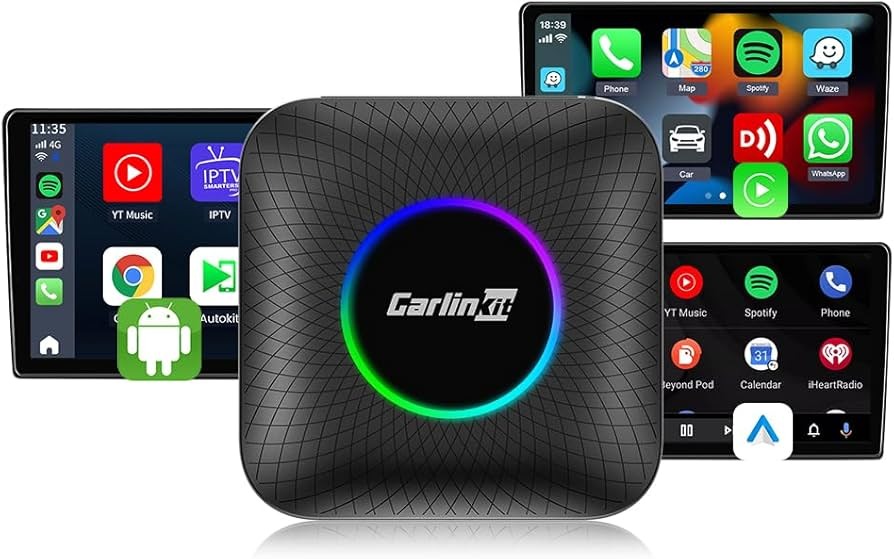
Carlinkit CarPlay AI TV Box Introduction
The Carlinkit CarPlay AI TV Box is an effective multimedia player that will be used to upgrade your wired system of CarPlay or Android Auto. This product is designed to offer a smooth streaming experience, improved performance and a sleek and glamorous appearance to the interior of your car.
Key features include:
- Android 13: Upgrade your car’s infotainment system to a complete streaming media system, enabling you to watch videos on YouTube and other video streaming apps.
- Chipset: The core of the device is the Qualcomm 6225 chip that provides a well-smooth operation and a well-performing processor. The 6225 chipset provides high-quality and fast performance that can switch between apps and stream high-definition videos without lag.
- Dual Memory Support: Carlinkit AI TV Box will be available in two memory configurations, 4GB RAM and 64GB storage or 8GB RAM and 128GB storage. These are good options that offer a lot of memory to install applications, store media, and stream videos without any problems. You are able to select the one that fits you most.
- LED Ambient Lighting: The AI TV Box will also provide LED ambient lighting to the interior of your car in addition to its performance. This personalized option does not only improve the appearance, but also gives it a more realistic entertainment effect, particularly when driving at night.
One should remember that this device presupposes the presence of a wired version of a CarPlay or Android Auto system installed in the factory, which makes it suitable to those who already have these systems. This will give it a seamless way of integrating without modifying your original infotainment system.
The things you should know before using Carlinkit CarPlay AI TV Box
Among the key considerations, prior to investing in the Carlinkit AI TV Box, it is necessary to make several considerations:
- Compatibility Check: Make sure your vehicle has a wired CarPlay or Android Auto system installed. The Carlinkit device leverages the existing wired system to function, so this is a critical requirement.
- Not Compatible with BMW and Tesla: As it is, the Carlinkit AI TV Box is not compatible with the BMW or Tesla cars. This is attributed to variation in system architecture which do not allow seamless integration with these brands.
The first step to a successful multimedia upgrade is to ensure that your vehicle is able to satisfy these requirements.
The Carlinkit CarPlay AI TV Box is a video box that operates through its working process
The Carlinkit AI TV Box is a product that is easy to use and operate instantly. Here’s how it works:
- Plug-and-Play: The device is extremely easy to install. When you install it into your car wired carplay or android auto system, it becomes a part and parcel of the infotainment screen that you already have. It does not need any complex installation or technical expertise.
- Wireless CarPlay & Android Auto: The AI TV Box will convert your hard-wired system to a wireless one, and your smartphone will be able to connect to it using Wi-Fi. This allows you to operate it without using your hands and this eliminates cable mess in your vehicle.
- Streaming Support: After a connection, the device will enable you to view popular streaming services on the screen of your car:
- Netflix: Have access to your favorite films, TV shows and even documentaries when on long drives or even when you are idle.
- YouTube: Watch videos, music content, tutorials, and educational videos on the display of your car. This dramatically increases your in-car entertainment to much more than the basic music and navigation.
- Netflix: Have access to your favorite films, TV shows and even documentaries when on long drives or even when you are idle.
Carlinkit AI TV Box will transform your OEM wired CarPlay into a fully developed multimedia system that will allow passengers of all ages to enjoy it.
The Advantages of a Multimedia Box to Your Car
Having the multimedia box installed in your car gives you a number of unique advantages:
- Entertainment on the Go: The existence of Netflix and YouTube support will help to keep passengers entertained even on long trips, on the road or even when parked. No longer will there be bored children and the impatient passengers in the long trips.
- Lighting: The LED ambient interior helps to make your car interior look more immersive. The lighting is much better than that of this case since you can stream a movie or watch a video and make it a more enjoyable and personalized environment.
- Personlized Memory: The two memory options (4GB RAM + 64GB storage or 8GB RAM + 128GB storage) will give you an opportunity to select the memory configuration that suits your needs in the media. The increased storage capacity allows you to store apps and videos on the device itself where you can access it when you are not connected to the internet.
- Future-proof: An android 13 operating system, the Carlinkit AI TV Box is kept up to date by the latest features and security patches. This is a guarantee of consistent performance and durability to your multimedia investment.
Installation guide Step by step instructions on how to fit the Carlinkit CarPlay AI TV Box
The Carlinkit AI TV Box is easy to install. To begin with, do the following steps:
- Plug the Device: Attach the AI TV Box to the wired CarPlay or Android Auto USB of your car.
- Power On: Activate your infotainment unit in your car. The device will start automatically and initialize.
- Connect Your Phone: Use the onscreen instructions and connect your smartphone wirelessly with CarPlay or Android Auto.
- Start Streaming: After connecting, go to Netflix or YouTube right on the screen of your car and start to stream.
With this easy system, you can convert your current system into a complete in-car entertainment system without having to involve a professional installer or do any complex installation or wiring.
The Ultimate Backseat Entertainment Solution
Carlinkit AI TV Box is particularly convenient among the families and passengers:
- Fit in Families: Movies or shows can be watched by kids and other passengers whenever they are travelling and this will ease the driver and improve the overall experience of the travelling.
- Safe to the Drivers: Although the system allows video streaming, one should use it in a responsible manner.
Why Do You Select Carlinkit to upgrade the entertainments of your car?
The Carlinkit AI TV Box is distinguishable based on a number of reasons:
- Quality & Performance: The Qualcomm 6225 chipset provides high-quality streaming, which is streaming without lag, even after a long use.
- Plug-and-Play Installation: The device can be used out of the box with your existing system by just plugging it into your existing wired carplay or Android Auto system, and it is easy to begin streaming.
- Great Value: The Carlinkit AI TV Box will offer one of the most affordable methods of enjoying streaming in your car, without the need to buy a new car or spend a lot of money upgrading a multimedia system.
Conclusion
The Carlinkit CarPlay AI TV Box provides a seamless solution to upgrade your car’s infotainment system, turning your OEM wired CarPlay or Android Auto into a full in-car multimedia experience. With support for Netflix, YouTube, and other streaming platforms, plus ambient LED lighting and flexible storage options, it offers a combination of entertainment, style, and convenience that elevates your driving experience.Check your vehicle’s compatibility today, and take the first step toward a fully upgraded in-car entertainment system.