
Complete Feature Analysis: Why the TBox UHD Is the Ideal CarPlay / Android Auto Solution
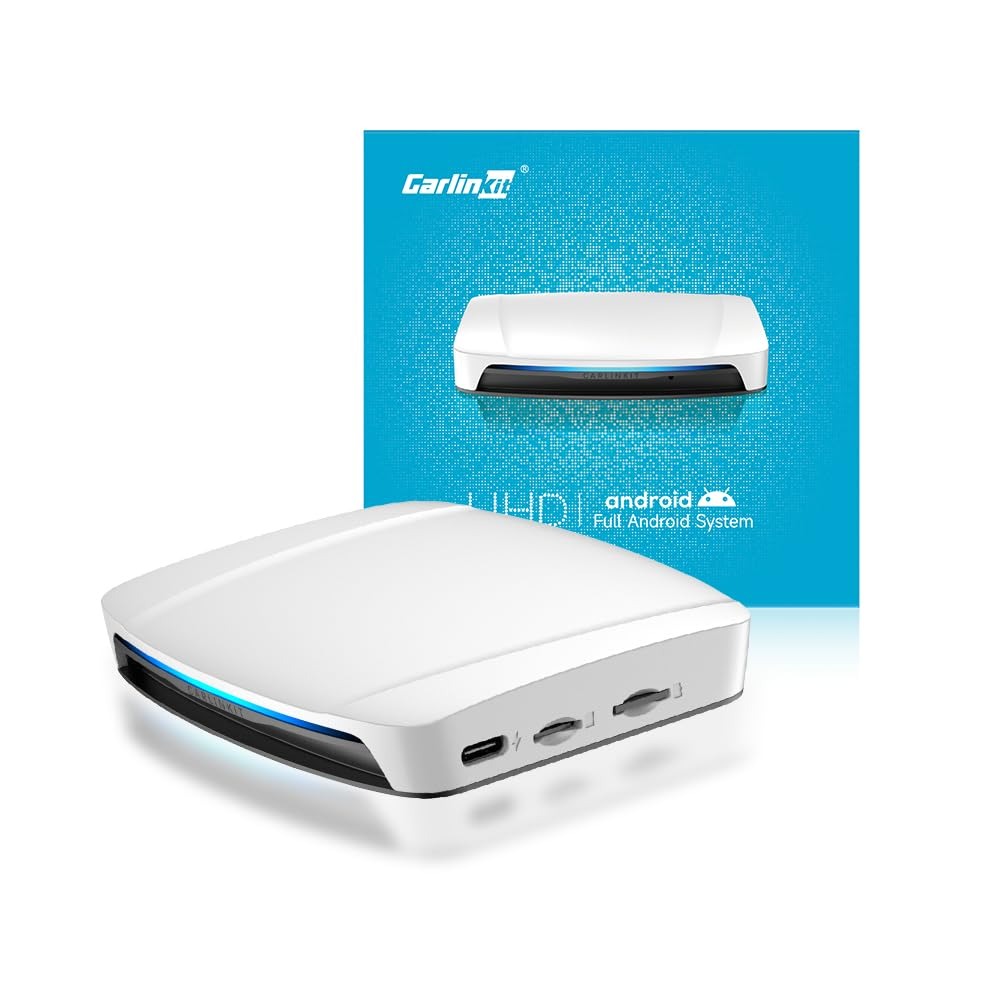
For drivers today, in-car connectivity is no longer a luxury but a necessity. As smartphones continue to grow rapidly along with mobile apps, accessing navigation, music, or videos through the central screen has become a standard. However, not all vehicles are equipped with advanced built-in systems capable of supporting such features. This is where the Carlinkit TBox UHD comes in—an innovative solution that integrates wireless CarPlay, wireless Android Auto, and an Android 13 system to offer a complete and flexible multimedia experience.
The TBox UHD is not simply an extension of the vehicle’s existing system; it completely upgrades the dashboard interface, transforming it into a multifunctional smart unit. With its robust hardware configuration—including a Qualcomm SDM660 processor, 8 GB of RAM, and 128 GB of expandable ROM storage—it allows you to run multiple apps and tasks simultaneously without slowdown. This power ensures smoothness and perfect responsiveness whether you’re using a GPS app, watching a video, or operating a multimedia application.
Another strong advantage of the TBox UHD is its ability to manage both the vehicle’s main screen and secondary screens via HDMI. This feature provides great flexibility: the driver can access navigation and essential information on the main screen while rear passengers enjoy videos, games, or other apps on a secondary display. This setup is ideal for families or long trips, offering entertainment and information at the same time.
In summary, the Carlinkit TBox UHD positions itself as the ideal solution to modernize any compatible vehicle by integrating advanced smartphone connectivity and the power of an Android 13 system into a single compact and efficient box.
Compatibility and Vehicle Models — Can Your Car Use the TBox UHD?
Before investing in a device like the TBox UHD, it is essential to verify vehicle compatibility. The TBox UHD is designed only for cars equipped with factory wired CarPlay or wired Android Auto. It is not a universal system, and installing it on non-compatible vehicles may result in limited functionality or the inability to use certain features.
Important: The TBox UHD is not compatible with BMW or Tesla vehicles. These brands use proprietary systems or specific hardware configurations that do not allow proper integration of the Carlinkit TBox UHD.
It is also helpful to distinguish different usage scenarios:
- Navigation: using Google Maps, Waze, or Apple Maps on the main screen via wireless CarPlay or Android Auto.
- Rear-seat entertainment: video streaming or app usage on a secondary screen via HDMI.
- Multi-screen sharing: the driver and passengers can use different applications simultaneously, offering a complete experience for everyone.
This targeted compatibility ensures seamless integration and optimal user experience for supported vehicles while avoiding performance issues on unsupported models.
Practical Experience and Use Cases — From Navigation to Entertainment
The TBox UHD transforms a standard dashboard interface into a multifunctional smart box capable of meeting all modern needs of a connected driver. Its practical benefits are noticeable within minutes of installation.
Wireless Navigation
Thanks to wireless CarPlay and Android Auto, the driver can connect their smartphone and access navigation, calls, messages, and music apps directly. No more cluttered cables or complex setups—the connection happens automatically via Bluetooth and WiFi, providing a smooth and intuitive experience.
Entertainment for Passengers
One of the most remarkable features of the TBox UHD is the HDMI output for secondary screens. Rear passengers can watch YouTube, Netflix, or other Android apps installed on the TBox UHD while the driver stays focused on the road with essential information shown on the main screen. This turns long journeys into an enjoyable experience for everyone on board.
Apps and Connectivity
The TBox UHD also allows installing and using various Android apps directly from the device. You can manage music, video streaming, podcasts, or even messaging apps without touching your smartphone. Additionally, the box supports mobile hotspot sharing, allowing all connected screens to stay online at all times.
In practice, the TBox UHD delivers a complete multimedia experience combining navigation, communication, and entertainment in a single powerful and compact device.
Technical Details and Interfaces — Hardware and Connections of the TBox UHD
The Carlinkit TBox UHD is equipped with high-end hardware to guarantee optimal performance:
- Processor: Qualcomm SDM660 for fast and smooth operation
- Memory: 8 GB RAM for managing multiple applications simultaneously
- Storage: 128 GB ROM, expandable for more apps and media storage
- Connectivity: WiFi, Bluetooth, and SIM for flexible online and offline use
- Interfaces: HDMI for secondary screens, USB/USB-C for initial connection and data transfer, and built-in GPS for precise navigation
Connection and Operation
Installation is simple: just plug the device via USB-C or USB, then pair it with your smartphone via Bluetooth or WiFi. Once setup is complete, CarPlay and Android Auto operate wirelessly, offering a full mobile experience without messy cables.
HDMI Output
The HDMI output supports high-definition and 4K display, allowing you to connect additional screens for rear passengers or the vehicle’s auxiliary displays. This enables independent display content between the main screen and secondary screens, ensuring a personalized experience for each occupant.
Buying Tips and After-Sales Support
Before purchasing a TBox UHD, it is important to check certain points to guarantee optimal compatibility and avoid disappointment:
- Vehicle compatibility: ensure your car has wired CarPlay or wired Android Auto, or that it has a secondary screen/HDMI input for HDMI use.
- Unsupported models: the TBox UHD does not work with BMW or Tesla vehicles.
- Purchase from the official website: this ensures access to official firmware, regular updates, and after-sales support, giving you safety and assistance in case of problems.
- Verify installation conditions: some cars may require specific kits or adapters to ensure proper connection.
By following these tips, you maximize your chances of fully enjoying the advanced features of the TBox UHD and benefiting from a smooth and reliable experience.
Conclusion
The Carlinkit TBox UHD is a powerful device offering multiple functions that allow compatible vehicles to transform into a true onboard connectivity hub. With wireless CarPlay and Android Auto, a complete Android 13 system, HDMI secondary screens, and strong hardware performance, it delivers a complete multimedia experience for both the driver and passengers.
But be sure to respect compatibility requirements: only vehicles equipped with wired CarPlay or wired Android Auto will benefit fully, and BMW and Tesla are not supported. Purchasing through the official website ensures regular updates and reliable support.
For anyone looking to modernize their vehicle and take advantage of navigation, music, and multimedia entertainment without limitations, the Carlinkit TBox UHD represents an ideal and complete solution.